

Receipt reading on Pro and Business; duplicate checks on every plan · See pricing
From receipt to verified payment — without the manual checking
OrderAgent turns a customer's payment receipt into evidence it can check, not a decision it makes on its own. It's AI-assisted extraction and automated verification — the final approval is always the business owner's, never the software's.
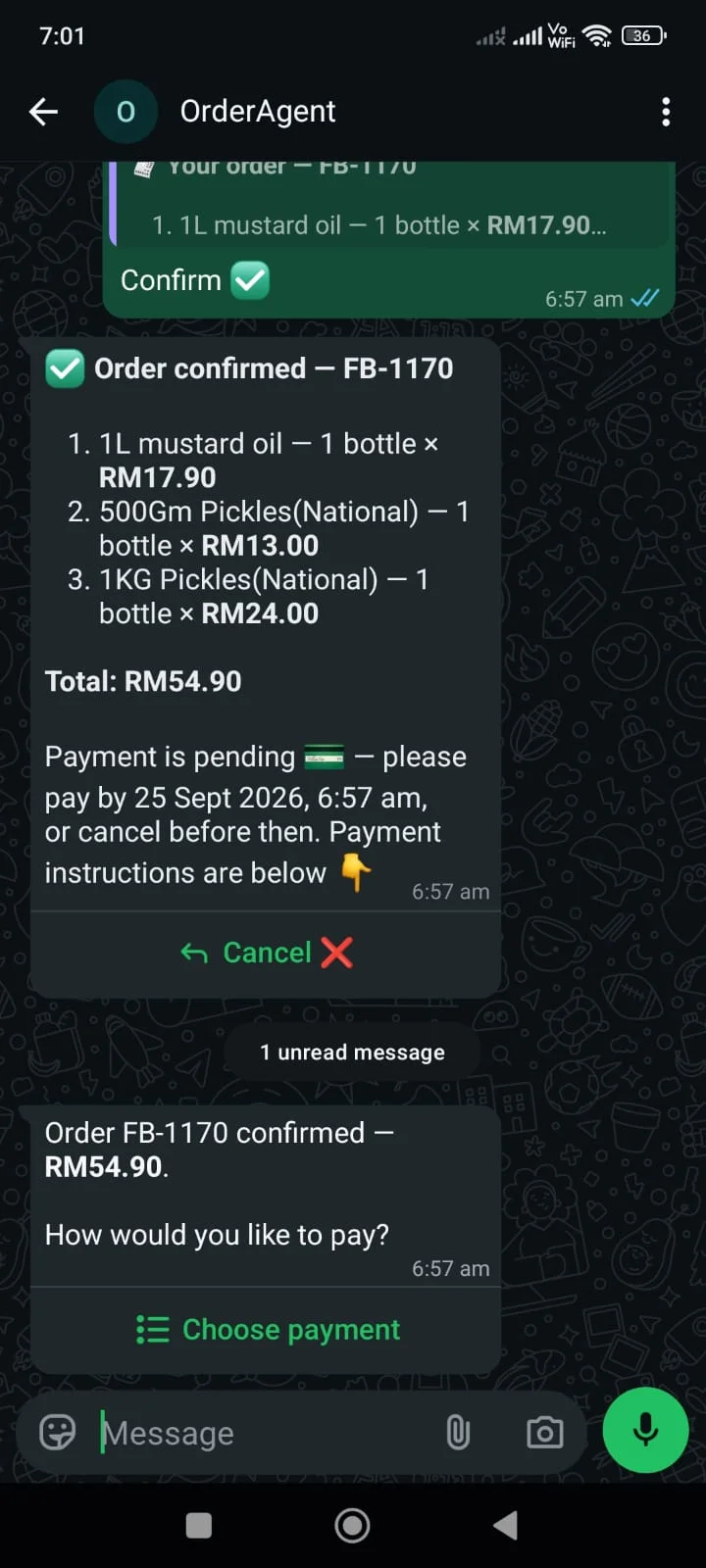
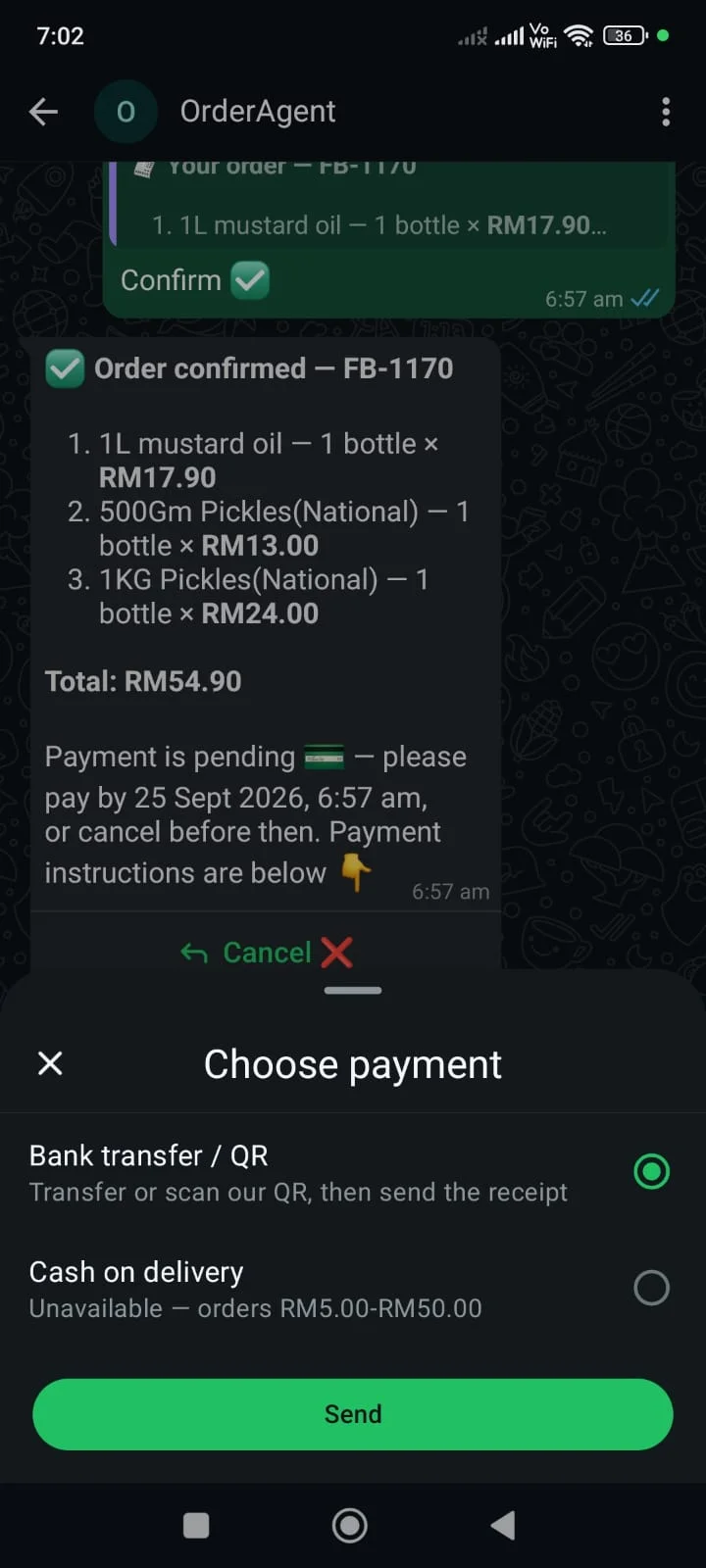
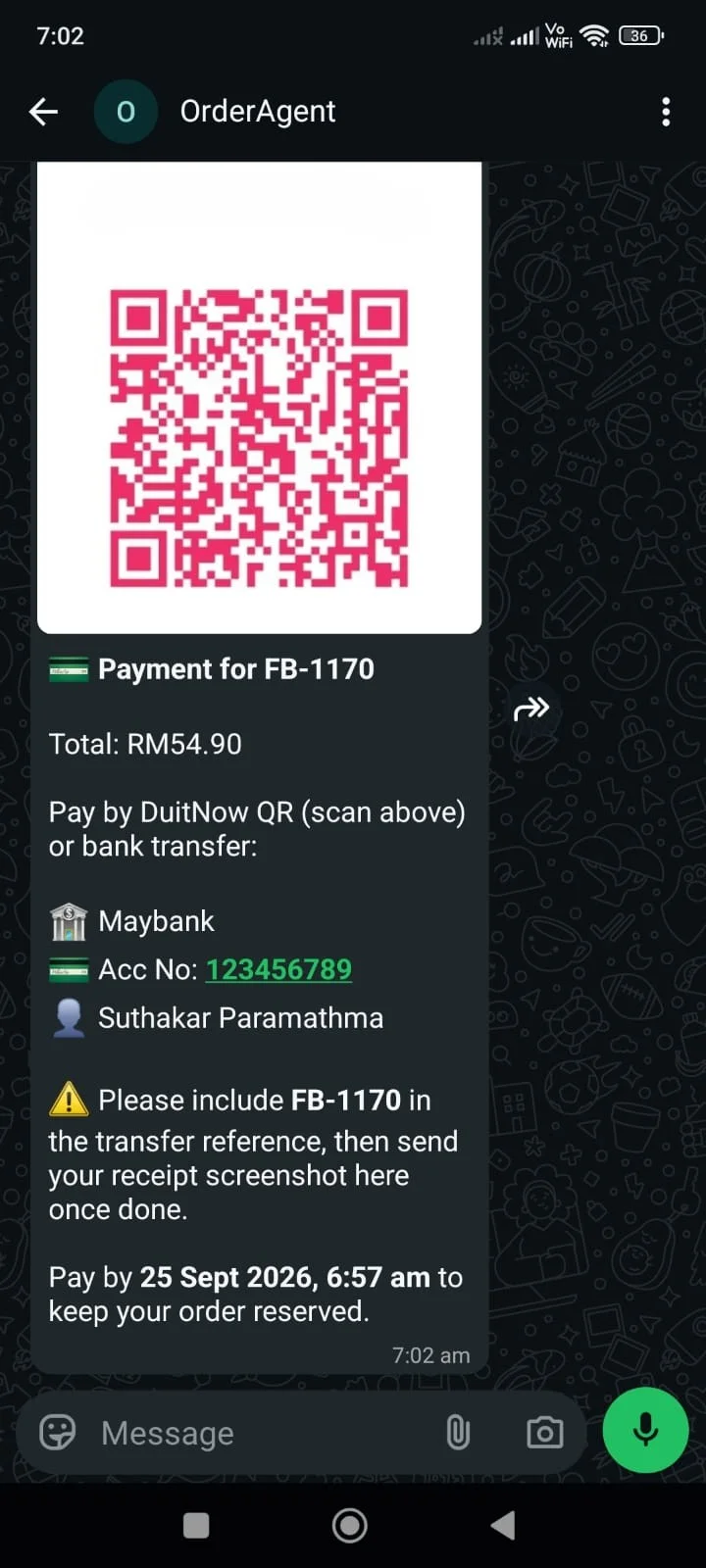
The customer chooses, before anything is sent
Bank transfer/QR, or cash on delivery where you allow it — presented as a plain choice the moment an order is confirmed. Nothing about how to pay goes out until they've picked.
- Choosing bank transfer sends the QR image, your bank details, the exact amount, the payment reference and the deadline — everything needed, in one message.
- The amount comes straight from the confirmed order total, never retyped or estimated.
A reference that finds the order, even if they forget it
The reference is what a customer types into the transfer, and the first thing looked for when a receipt lands — so a payment is matched to their specific order, not guessed at from a name or a screenshot.
- Left off the transfer, it's still worth checking: OrderAgent looks through a customer's recent messages for it before falling back to their most recent order awaiting payment.
Deadlines and reminders that behave
A confirmed bank-transfer order holds stock, so it can't stay open forever. A reminder goes out before the deadline; if it passes unpaid, the order expires and the stock returns.
- Confirming reserves that stock for this order alone — held for this customer, not sold to someone else in the meantime — until it's paid, cancelled, or the deadline passes.
- Both respect your shop's quiet hours, in your shop's time zone.
- Quiet hours delay the message, never the state change.
- An order is never expired while a receipt is sitting on it undecided.
- EXTEND buys a customer more time in one message.
The receipt does the talking
A customer just sends their receipt as a photo or PDF on WhatsApp — nothing to type by hand. It's downloaded, stored privately, and read for amount, currency, date, reference and recipient, ready for the checks below.
- Receipt images carry account numbers and names. They live in private storage, never reachable by a public URL — the dashboard signs a short-lived link per view.
Six checks, in a fixed order
Duplicate image, duplicate reference, currency, transaction date, amount, recipient account. The first failure wins, so the reason you see is the first thing that was actually wrong — not a generic “review this”.
- Together, they're what stops an old screenshot, a receipt meant for a different transaction, or one already used once from quietly passing as proof of payment here.
- The duplicate checks run on every plan, because they need no reading at all.
- A receipt showing no currency is not treated as a mismatch.
- Currency aliases are generous — Rs, Rs., INR and ₹ are one currency.
- The reading prompt carries your country and time zone, because assuming the wrong one skews a timestamp straight into the date check.
The decision stays with you
OrderAgent extracts the details and runs the checks — it never approves a payment itself. Everything lands in one review queue, and you decide: on the dashboard, or without leaving WhatsApp.
- Approve, reject, or record a partial payment where only some of the amount has come in.
- A rejected receipt can't quietly become approved later — the order stays protected until a fresh one is submitted and reviewed.
- Every approval, rejection and partial payment is recorded, so there's a traceable history of what happened and when.
- The dashboard always shows exactly where an order stands — awaiting payment, under review, partially paid, or paid.
The invoice, with no extra step
A numbered PDF invoice is generated from the order's frozen prices and quantities — not today's catalogue — and delivered to the customer on WhatsApp: by default when the order is confirmed, or once you approve payment if you prefer. No extra step for you either way.
Cash on delivery, tracked honestly
Where it's enabled, a customer can choose to pay in cash instead — and delivering the order is never confused with being paid for. It stays visible as unpaid until you record it as collected.
- The amount actually collected is recorded on its own, separately from the delivery status — a real financial trail, not just a delivered stamp.
- A private, time-stamped delivery photo is kept as evidence for that order, if it's ever needed.
See payments & receipts on your own shop
Onboarding is hands-on — a number provisioned for you, your catalogue loaded, your payment details set up with you on the call.