

WhatsApp, automated around your business
Your customers keep using WhatsApp exactly as they do today. OrderAgent handles the conversation, the order, the payment, the notifications and the operational workflow behind it.
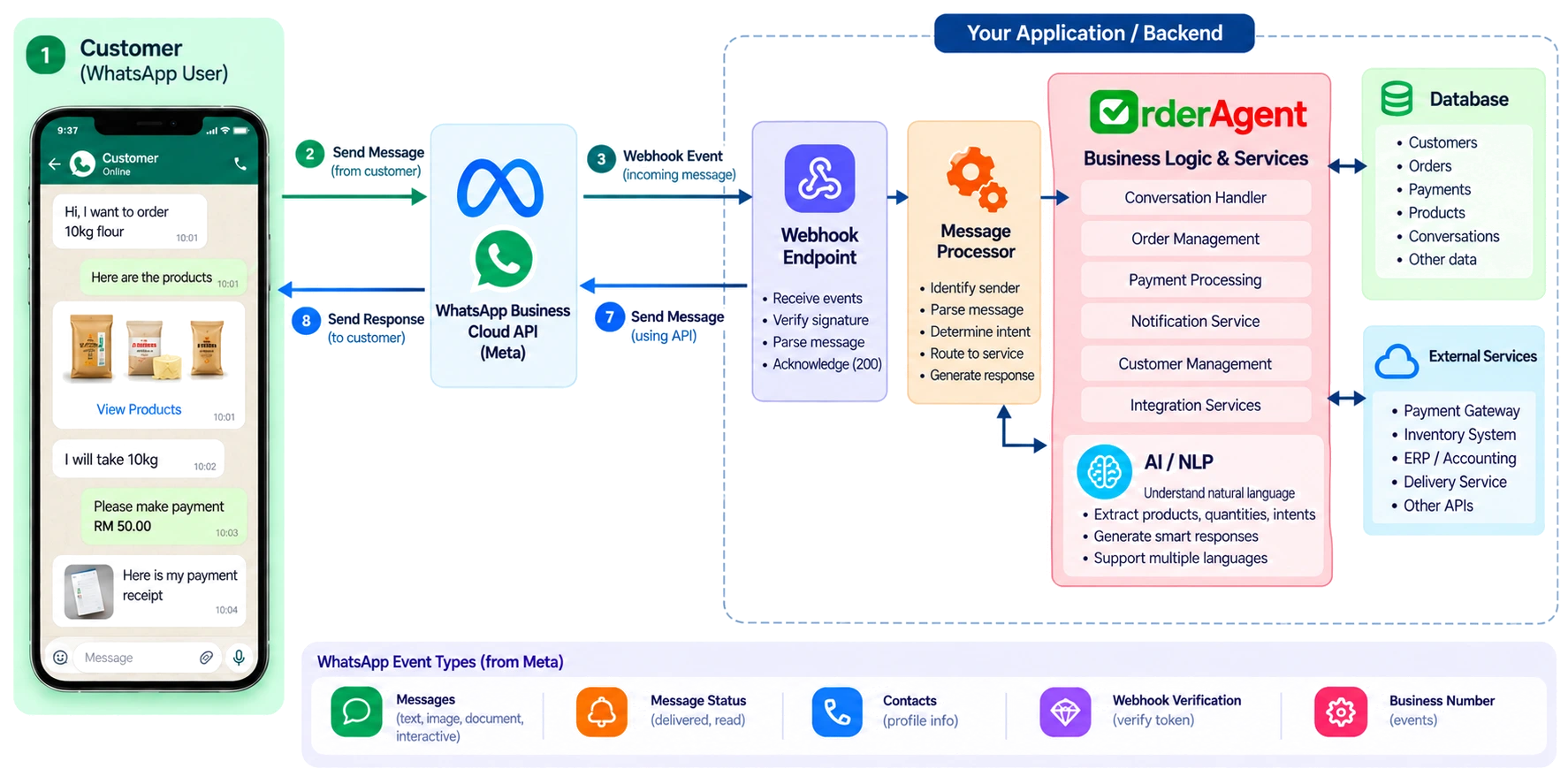
One conversation, start to finish
A customer's message becomes a product, an order, a confirmed order, a payment, a receipt, an owner's approval, an invoice and a delivery update — one continuous thread in the one conversation they already have with your shop. Every stage below happens inside it, never a second app or a portal along the way.
On the official WhatsApp Business Platform
Every message goes through Meta's own Cloud API, on a number registered to your business — never an unofficial client, which is how shops that automate WhatsApp any other way risk losing their number entirely.
- Customers keep using the number they already have saved. There's nothing to switch or reinstall.
- A webhook is what wires Meta's infrastructure directly into your orders, payments and notifications, the moment a message arrives.
Every message finds the right business and the right customer
Meta tells OrderAgent which of your numbers a message arrived on, so it's routed to your business and never a stranger's. From there, the sender's WhatsApp number is matched to their own customer record — or a new one is created on the spot.
- A message WhatsApp delivers twice — a retry, a duplicate webhook — is recognised by its own message ID and can never create a second order.
Understood the way people actually type, and turned into an order
No fixed format, no command list. Product names, quantities and units are read out of ordinary phrasing — in English, Tamil, Malay, or any mix of them — and matched against your catalogue. A first order-shaped message starts a draft; everything after it from the same customer adds to that same order, until they tap Confirm.
- Confirm, Cancel and choosing how to pay are WhatsApp buttons — nothing important depends on typing a word exactly right.
- Confirming is what actually commits the order: it reserves stock and freezes every price at that moment.
Payment, receipt and approval, without leaving the chat
Confirming sends straight into payment: the QR, bank details, exact amount and reference — or cash on delivery, where it's allowed. A receipt sent as a photo or PDF is read and checked automatically before it ever reaches you. You approve, reject or record a partial payment from the same conversation, and the invoice goes out the moment you do.
Customers can ask, instead of you answering
"Where's my order?", "do you have Almond 25kg?", "what's my saved delivery address?" — answered directly from their current order, your catalogue and their own account, not treated as a fresh conversation needing you every time.
- Past orders too: "what was my last order?" or "how much have I spent this year?" are answered from their real order and payment history — no need to ask you to look it up.
Owner commands, on the same number, kept separate
PAID, PACK, SHIP, DELIVERED and the rest are recognised as owner or staff commands the moment they arrive from an authorised number — never confused with a customer's order. Staff can be given fulfilment commands without ever touching money, and a platform admin's own session is kept apart from both.
The rules WhatsApp sets, respected automatically
STOP and START are checked before anything else runs, so an opt-out always works. A proactive message sent outside the 24-hour window WhatsApp allows for free-form replies uses an approved template instead — automatically, never silently dropped for being sent at the wrong moment.
Notifications and campaigns that go out on their own
A payment reminder before the deadline, one message per real change as an order moves through fulfilment, a short daily summary even on a quiet day — sent without you remembering to, inside your shop's own quiet hours.
- A broadcast reaches exactly the audience you choose — everyone, a tag, a product's buyers, or how recently someone last ordered — with the real recipient count shown before you send.
See whatsapp automation on your own shop
Onboarding is hands-on — a number provisioned for you, your catalogue loaded, your payment details set up with you on the call.