

Keep the chat. Put a bot, a human and a dashboard behind it.
The chat was never the problem. Trying to run a business by scrolling back through it was. OrderAgent puts an AI-assisted bot, a human handover and a phone-first dashboard behind your WhatsApp number, so customers keep messaging the way they do and you get orders, payments and a record instead of a thread.
Business challenges
A chat is a great front door and a poor back office.
Most WhatsApp businesses take orders in the thread, send prices and payment details by message, collect receipts as screenshots and broadcast to a list. It works, until volume turns the thread into the job.
Orders live in a scroll
An order is a few lines in a thread, and finding it again means scrolling back. Nothing has a status, a total or a reference.
The same questions, every hour
Price, stock, “where is my order?” — the answers already exist somewhere, and each one still costs someone a reply.
Payment by screenshot
Receipts arrive as images in the same thread as everything else, and matching each one to an order is done from memory.
The message that needed you gets buried
A customer asking for a person is one line among fifty, and nothing separates it from the rest.
Broadcasts to everyone
A promotion sent to the whole contact list reaches the customers it was never for.
Bots that make things up
A chatbot that guesses a price or invents a product costs more than the replies it saves.
How OrderAgent helps
A bot, a person and a dashboard, working from one number
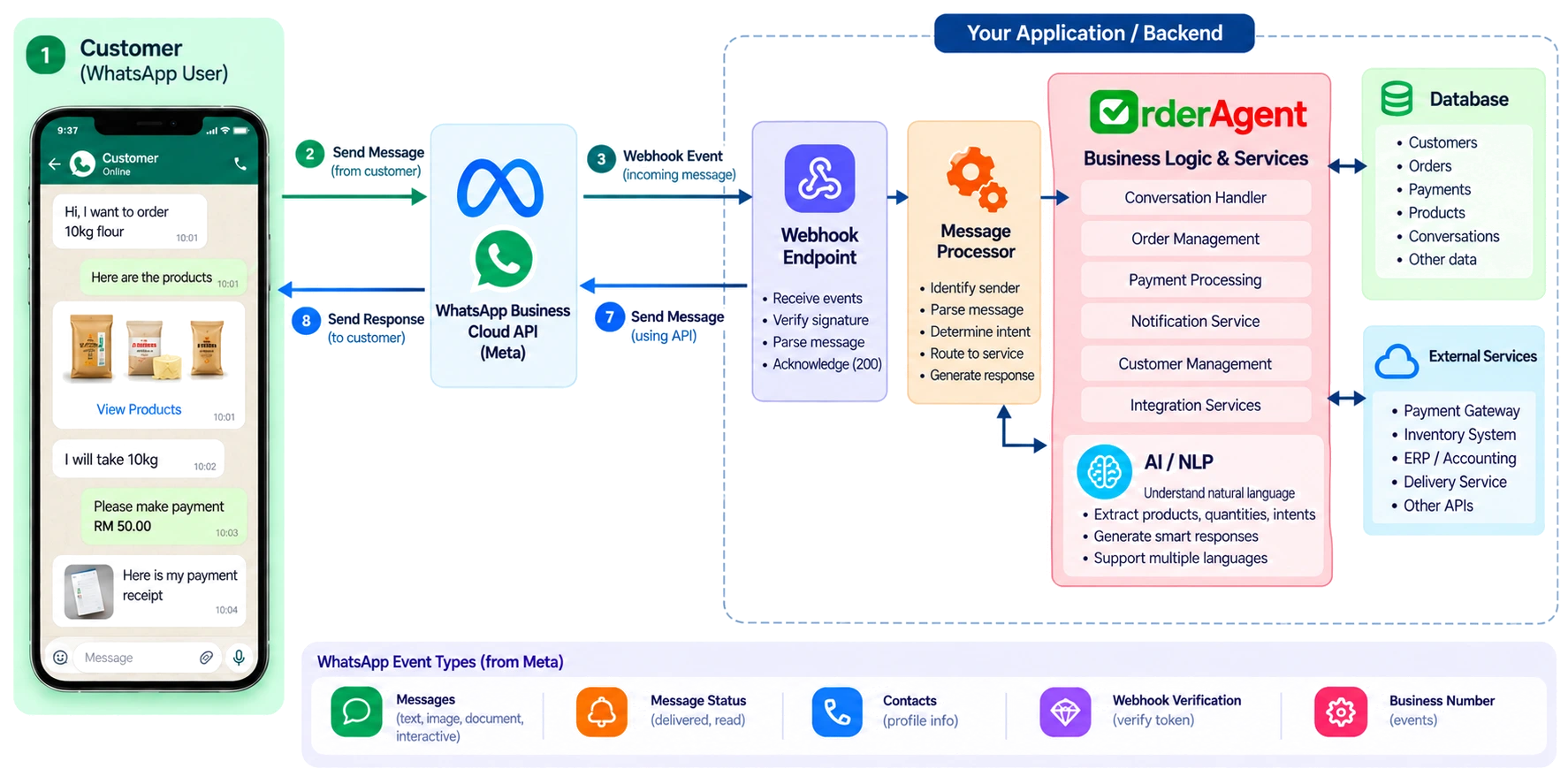
OrderAgent runs on the official WhatsApp Business Platform. The bot handles what's routine, a person handles what isn't, and the dashboard shows you which is which.
The bot handles the routine
Customers ask for a price, whether something's in stock, where their order is, how to pay, or what they ordered last time, and get an answer from your real catalogue and their own records — in English, Tamil, Malay or any mix. The same conversation takes the order, and the customer confirms it themselves.
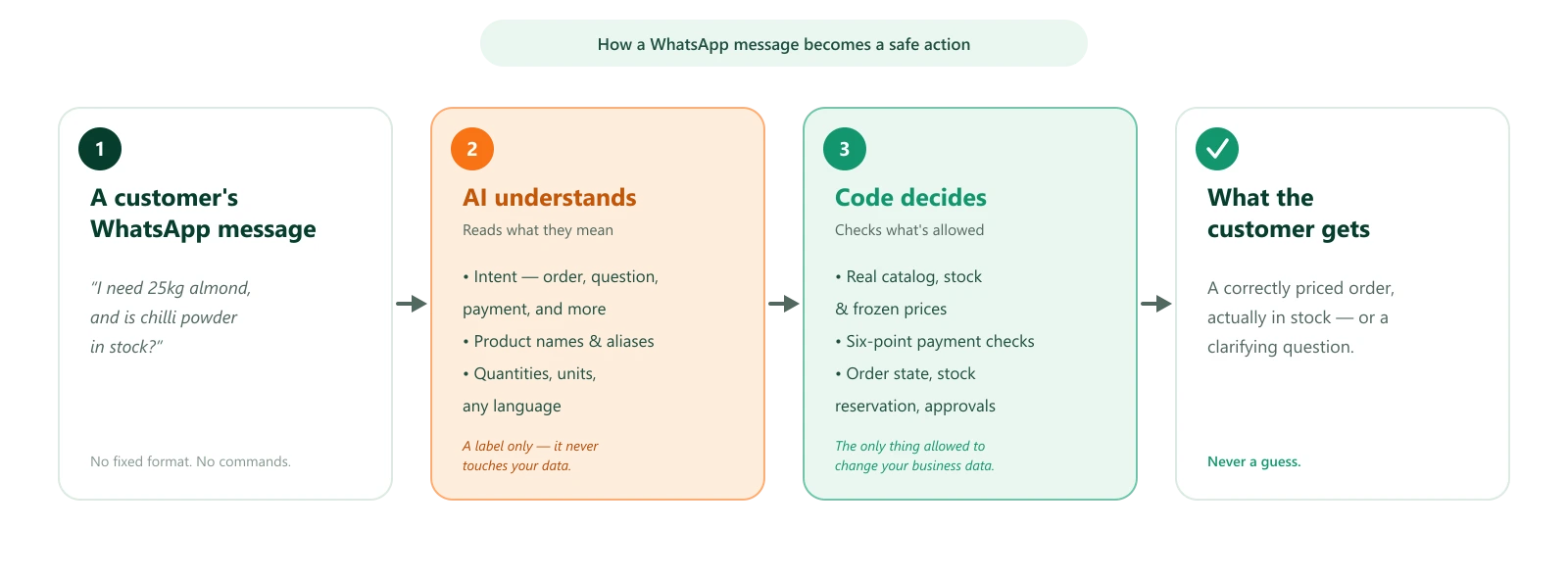
The AI reads. Code decides.
The model's only job is to work out what a message means. Every price, quantity, status and sentence a customer reads comes from your data and tested code, so it can't invent a product, quote a price you didn't set or approve a payment.
A person steps in when asked
A customer who asks for the owner or an agent gets one short acknowledgement, and the bot pauses on that conversation for 30 minutes or until you resolve it. You're alerted with their message, and anything they send afterwards is added to the same alert instead of burying your inbox. Receipts sent during a pause are still processed.
One list of what needs you
Alerts collect in one inbox with what needs you first: a customer asking for a human, a message the bot couldn't understand, an AI outage, a change requested on a paid order, a receipt that matched no order. Nothing is left for you to spot in the thread.
Your team, with the right access
You run the shop by messaging your own bot: PAID, PACK, SHIP and DELIVERED work as commands, and the dashboard opens from a link sent to your phone, with no password. Staff can pack, ship and deliver without being able to approve a payment.
The official platform, rules respected
Everything runs on Meta's WhatsApp Business Platform, never an unofficial client. STOP always works, and outside WhatsApp's 24-hour window proactive messages go out as approved templates automatically.
Relevant features
Everything that runs inside the chat
Where the AI and the automation actually show up in a WhatsApp business.
Ordering and answers, in the conversation
A free-text message becomes an itemised order card with Confirm and Cancel buttons. Ask “do you have almond?” and the answer comes from your catalogue and stock, with the product's photo when the question is about one product.
Learn more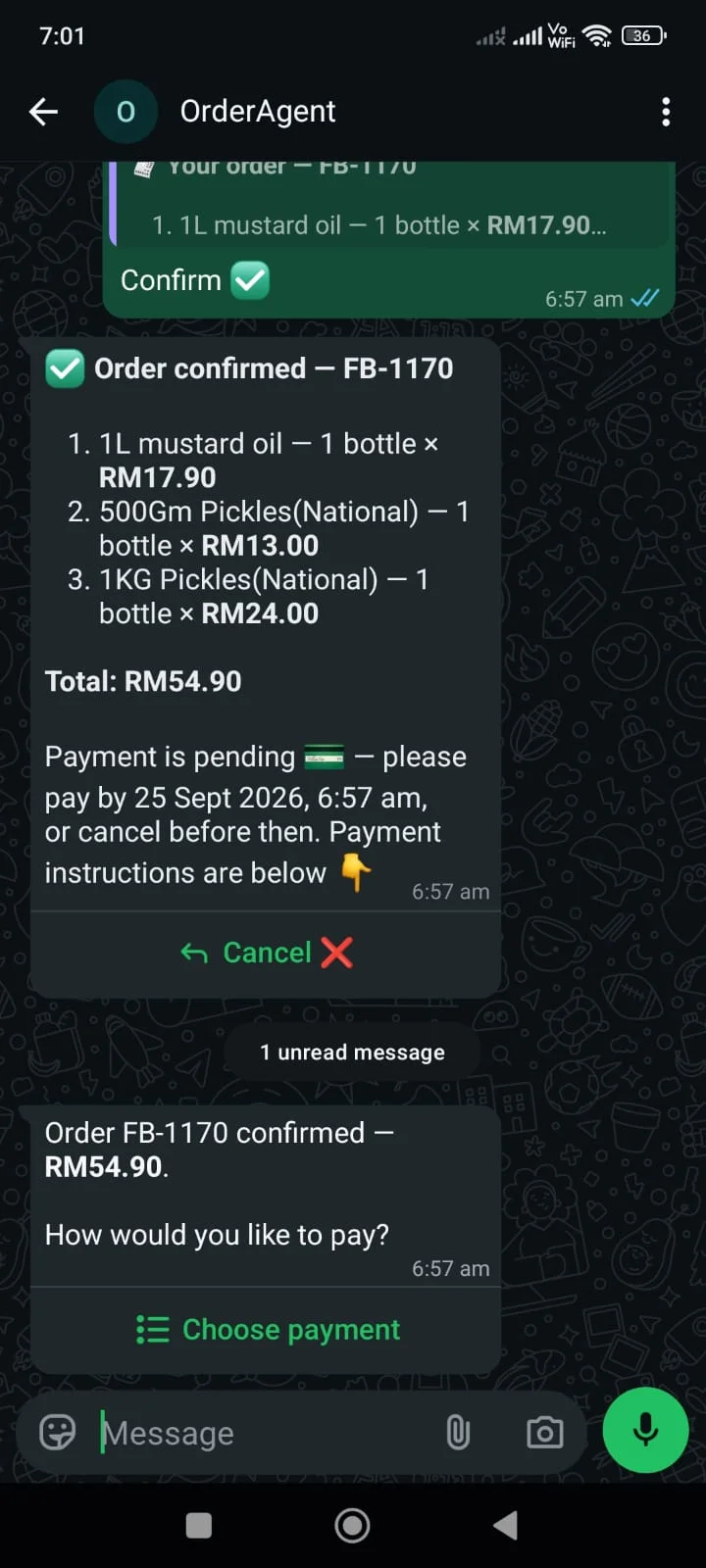
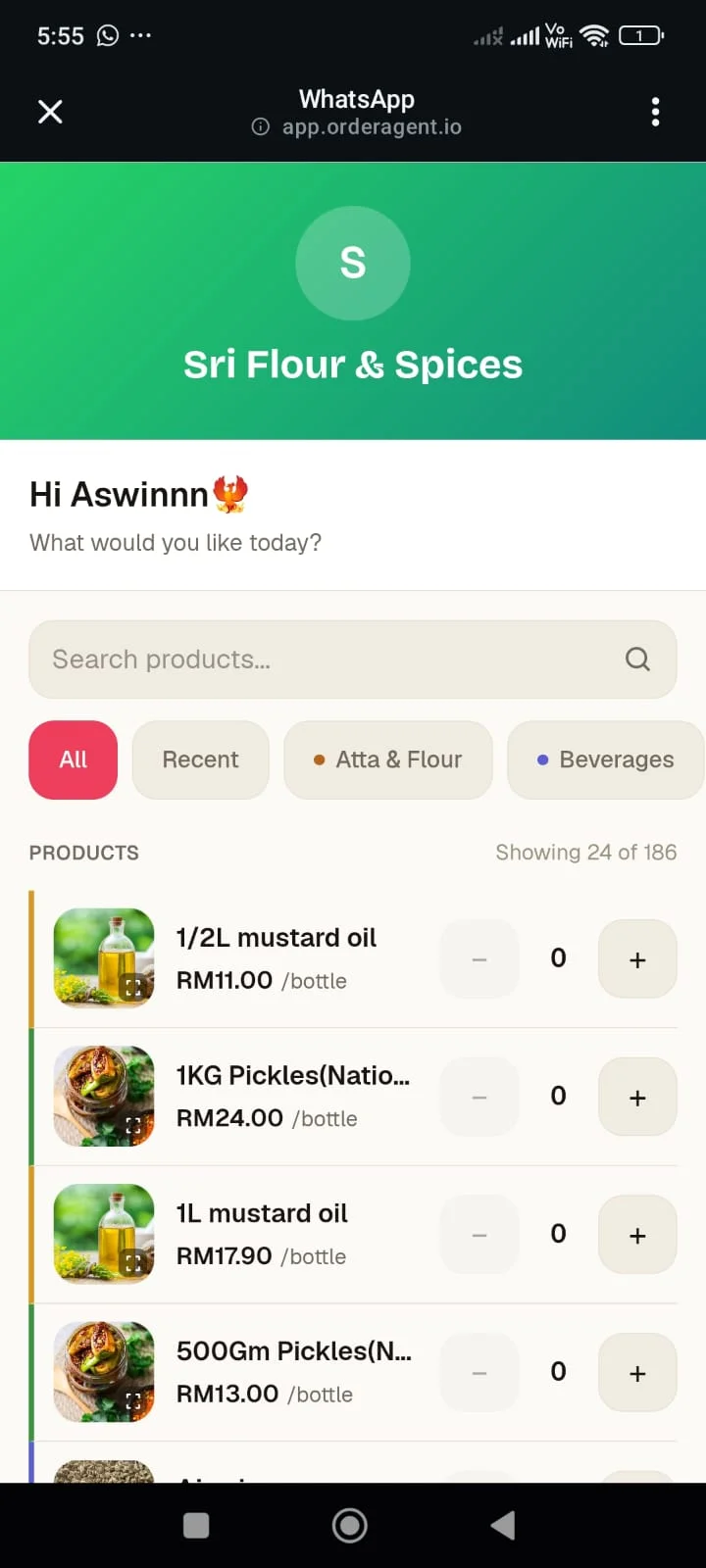
A catalogue link inside the chat
The greeting can carry a button to each customer's personal, mobile catalogue. They browse with photos and stock, build a cart and send it back into WhatsApp, where the same Confirm button applies. Available on Pro and Business.
Learn moreReceipts read, never auto-approved
A receipt photo or PDF is read for amount, reference, date, currency and recipient, then checked against six rules before it reaches you. The AI extracts; it never decides, and approving is always your tap. Reading and matching are on Pro and Business; every plan gets the duplicate-receipt checks.
Learn more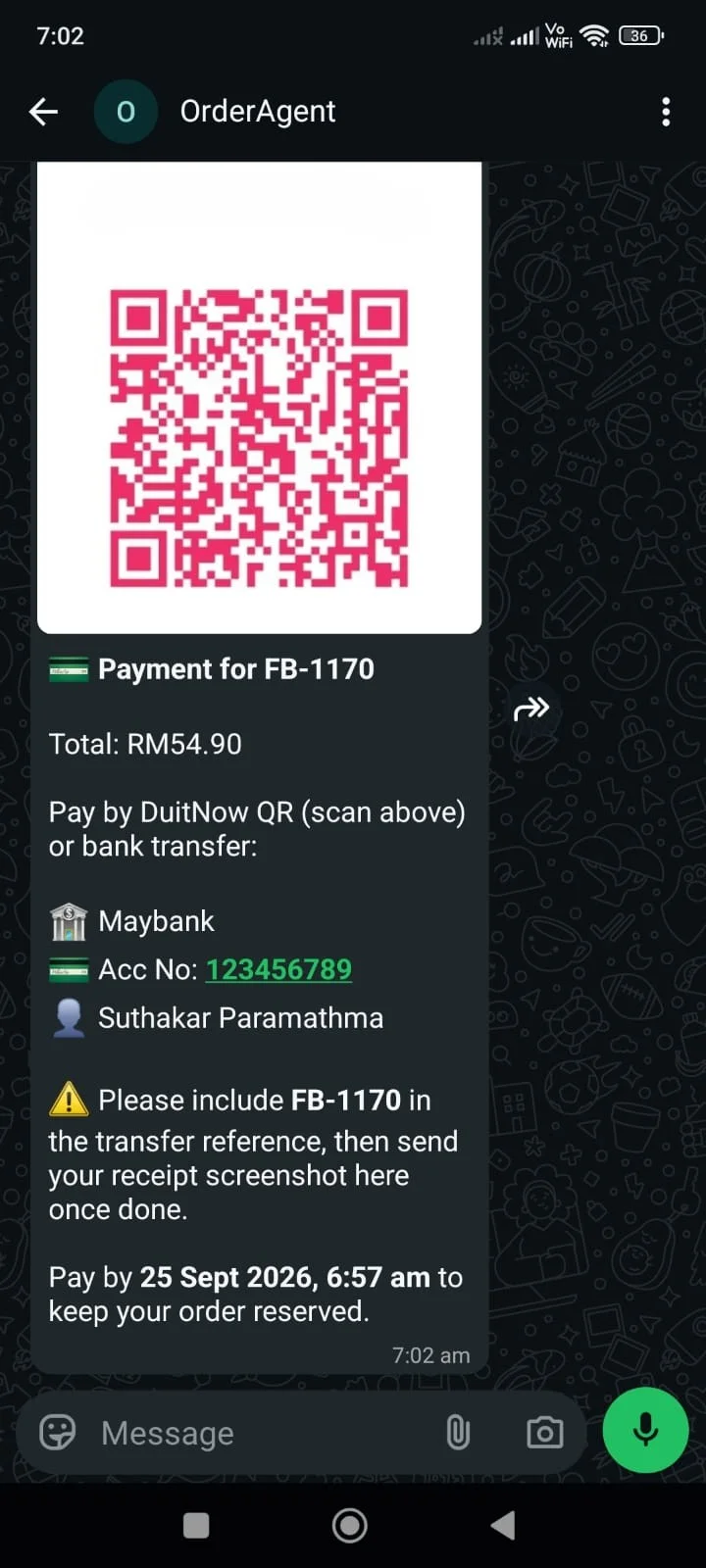
Campaigns to the right audience
Send a promotion to everyone, to a tag, to a product's buyers, or to people who ordered recently or haven't in a while. The real recipient count is shown before you send, and STOP is always honoured. Available on Pro and Business.
Learn moreSee how the bot is doing
Bot Today shows the share of orders the bot handled on its own, how many clarifying questions it asked and how often it needed you. Words customers used that matched nothing are logged, so you can teach the bot your vocabulary. Available on Pro and Business.
Learn moreUpdates that send themselves
Payment reminders before a deadline, one message per real change as an order is packed and delivered, and a daily summary for you, all sent inside your quiet hours without anyone remembering to. When the 24-hour window has closed they go out as approved templates. The daily summary is on Pro and Business.
Learn moreA Tuesday on a WhatsApp-run shop
Morning: a customer asks “Do you have almond 1kg?” The bot answers with what's in stock. Nobody on your team stopped what they were doing.
Midday: another customer sends a list — “2kg rice, 1kg sugar, half kg chilli powder pls.” It comes back as an itemised card with Confirm and Cancel. She taps Confirm, payment instructions arrive, and later her receipt lands in your queue checked against the order.
Afternoon: a customer writes “can I talk to the owner?” The bot acknowledges once and pauses on that conversation. You get an alert with the message, get in touch with them, and resolve the alert; the bot picks up again.
Evening: one message the bot couldn't make sense of sits in the same inbox as an alert rather than a made-up answer, and your daily summary arrives with the day's activity.
Before vs after
What actually changes
Before
- Orders buried in a thread, with no status, total or reference.
- The same product, stock and status questions answered by hand.
- Receipts matched to orders from memory.
- A customer asking for a person lost among fifty other lines.
- Promotions sent to everyone on the list.
With OrderAgent
- Every order a structured record with a status, a total and its own reference.
- Routine questions answered from your catalogue and the customer's own history.
- Receipts read and checked against the order, with the final approval yours.
- One inbox of what needs a person, with the customer's own words attached.
- Campaigns sent to an audience you choose, with the recipient count shown first.
Business benefits
What changes
No new app for customers
Customers keep messaging the number they already have — no app, portal or password.
Instant answers to routine questions
Price, stock, order status, payment details and their own history, answered from real data.
A person, with context
When someone asks for you, you're alerted with their message and the bot steps aside.
Nothing invented
The AI only labels messages. Prices, numbers and every reply come from your data and tested code.
On the official platform
Built on Meta's WhatsApp Business Platform, with STOP and the 24-hour rules handled for you.
See how it's going
The alerts inbox shows what needs you. On Pro and Business, Bot Today and the daily summary show what the bot handled.
Other business types
Keep the chat. Add the system behind it.
Onboarding is hands-on — a number provisioned for you, your catalogue loaded, your payment details set up with you on the call.